Features
What the messenger does, and how it stays out of the way.
A chat bar for your WordPress site with guest chat, private messages, photos and proper moderation. It runs on our servers and only loads when someone clicks it.
Loads on click
Your pages load as fast as they did before.
Most chat plugins load their whole app the moment a page opens, whether anyone chats or not. That slows every page for every visitor.
WOC Messenger loads a small Chat bar and nothing else. The messenger itself only connects when someone clicks it, so people reading your articles or browsing your shop never pay for it.
- Nothing heavy on page load. No chat connection is made until a visitor asks for it.
- Stays open as they browse. Once someone opens chat, it carries on across pages.
- Your choice of mode. Prefer live user counts straight away? Switch to auto-connect in the plugin settings.
How it loads
1. The page loads with just the Chat bar.
2. A visitor clicks Chat or any button you’ve marked as a chat link.
3. The messenger connects and opens. That’s the first moment any chat code runs.
Guest and member chat
Everything people expect from a chat room.
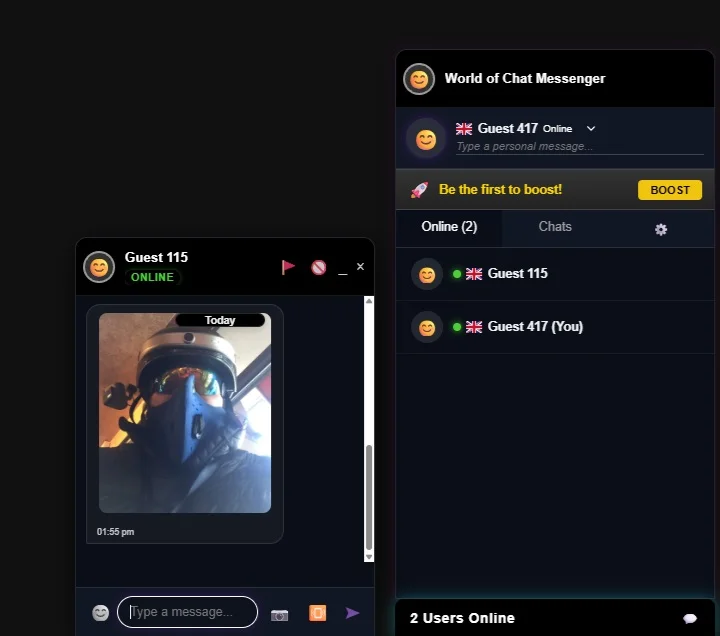
Guests type a name and they’re chatting. Members who are logged in to your site are signed in automatically, so they never see a login box.
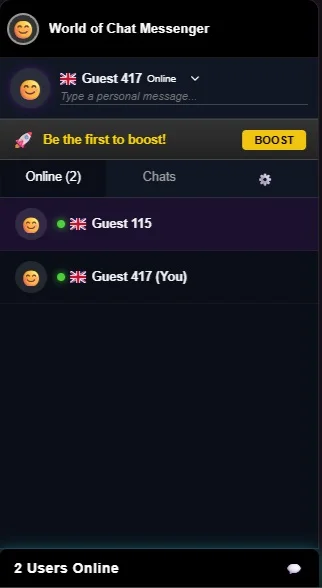
- Who’s online. A live list with country flags and a personal status line.
- Private chats. One-to-one conversations, each in its own window.
- Photos and emoji. Share a picture straight from the chat box.
- Chats tab. Every conversation in one place, with unread messages marked.
- Phones. On mobile the messenger opens as a full-screen drawer.
Off your database
Busy rooms don’t slow your site down.
Plugins that store chat in WordPress keep asking your database for new messages every few seconds. On shared hosting that soon drags the whole site down.
WOC Messenger runs on its own chat server. Messages, who’s online and photo sharing are all handled there, so your WordPress database isn’t touched by chat at all.
- No chat tables in WordPress. The plugin doesn’t fill your database with messages.
- Fine on shared hosting. Your host only serves your pages, not the chat.
- Busy nights are fine. A packed room doesn’t slow down your articles or shop.
Why chat sometimes pauses
If you leave a tab in the background for a while, your browser freezes it. That’s the browser, not the messenger. Come back and it reconnects on its own.
Reconnects itself
Comes back to life when you do.
Phones and browsers put background tabs to sleep to save battery, and no website can stop that. So instead of pretending to stay connected, the messenger notices the moment you come back and reconnects straight away, without reloading the page.
- Switching tabs. Chrome and Edge sleeping tabs reconnect when you return.
- Phones. Unlock your phone and the chat picks up again.
- No refresh needed. Messages you missed load in when it reconnects.
Moderation
Keeping it civil, without the hassle.
Every chat window has a report button, and anyone can block someone they don’t want to hear from. From your dashboard you can:
- See reports as they come in
- Read the conversation behind a report
- Ban by username or by IP address
- Lift a ban if you change your mind
Community Boosts
Let your regulars chip in.
A busy room costs money to run. Any member can buy a Boost to top up the room’s message allowance, so you’re not paying for every conversation yourself. Whoever boosts gets their name on the banner as a thank-you.
Chat boosted by Sam example banner
See it working before you buy.
The messenger runs on World of Chat every day. Have a look, then pick a plan.