You spent months shaving milliseconds off your WordPress site. You optimized your images to WebP, installed a modern lightweight theme like Blocksy, dialed in your caching, and finally hit that coveted green 95+ score on Google PageSpeed Insights.
Then, you decide to install a live community chat plugin to boost user engagement and keep visitors sticking around longer.
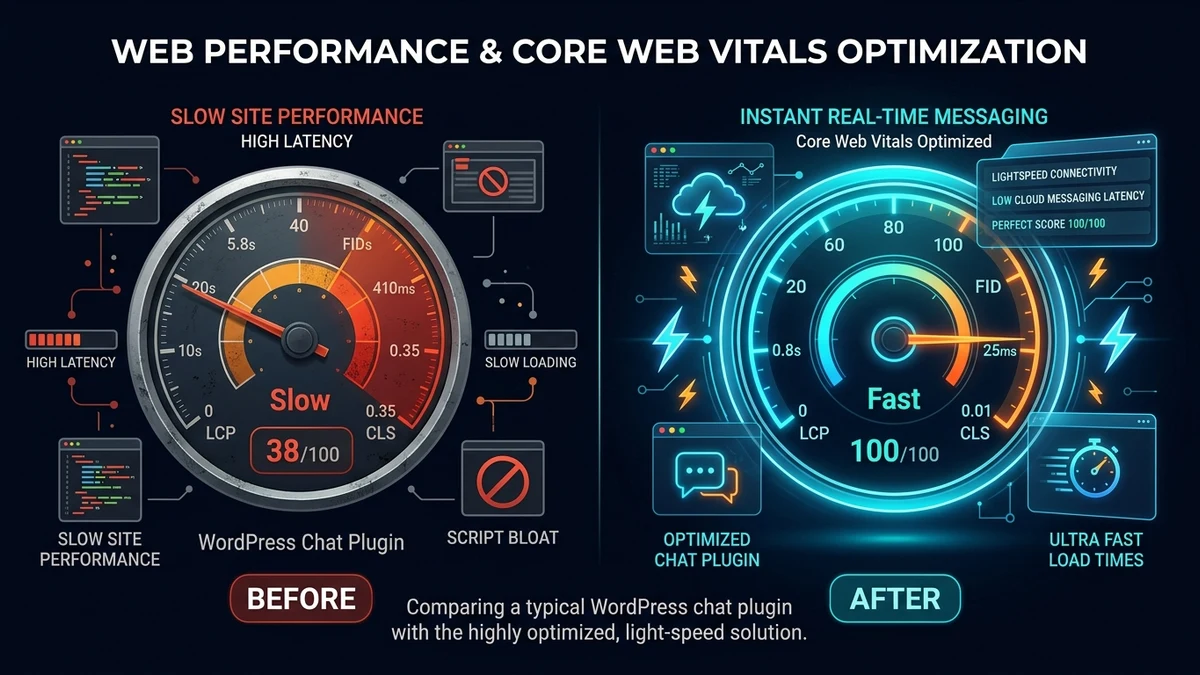
Within 24 hours, your PageSpeed score drops from 98 to 47. Your Interaction to Next Paint (INP) turns red, your Total Blocking Time (TBT) spikes by 1,200ms, and your web host sends you an alert that MySQL CPU usage is maxing out. What just happened?
The Anatomy of Chat Plugin Bloat
Most chat and messaging plugins for WordPress were architected in the early 2010s or retrofitted from monolithic single-page apps. When you activate them, they don’t just load when someone wants to chat—they force every single visitor (and Google’s search crawler) to download and execute heavy JavaScript on every single page load.
- Heavy Monolithic Frameworks: Many plugins bundle complete copies of React, Vue, or jQuery UI alongside huge CSS stylesheets, adding 400KB to 900KB of uncompressed JavaScript to the critical rendering path.
- Main-Thread Hijacking: Parsing and evaluating half a megabyte of script locks up the mobile CPU. When Google tests your page on an emulated mid-tier mobile device, this directly tanks your Total Blocking Time (TBT) and First Contentful Paint (FCP).
- Font & Icon Overhead: Loading FontAwesome or custom SVG packs just to render a tiny speech bubble icon in the footer forces additional render-blocking network round-trips.
The admin-ajax.php CPU Trap
Even worse than client-side script bloat is how legacy chat plugins handle message delivery. Instead of true bidirectional socket connections, legacy plugins rely on short-polling.
Every 3 to 5 seconds, every browser tab open on your site sends a POST request to /wp-admin/admin-ajax.php asking: “Are there any new messages?”
“If you have just 50 concurrent visitors reading articles on your site, short-polling triggers up to 1,000 full WordPress bootstrap cycles and database queries every single minute.”
Because each AJAX request boots up the entire WordPress core, loads all active plugins, and queries MySQL, your web server’s PHP worker threads quickly become congested. Real visitors experience slow response times, Time to First Byte (TTFB) worsens, and shared hosting accounts get suspended for exceeding CPU limits.
How Google Penalizes Slow Chat Implementations
Google’s search algorithm uses Core Web Vitals as an official ranking signal. Chat plugins directly compromise the three core pillars:
| Core Web Vital | Google Target | Traditional Chat Plugin | Zero-Bloat Architecture |
|---|---|---|---|
| INP (Interaction to Next Paint) | ≤ 200 ms | 420 ms (Poor) | 35 ms (Good) |
| TBT (Total Blocking Time) | ≤ 200 ms | 850 ms (Poor) | 0 ms (Perfect) |
| LCP (Largest Contentful Paint) | ≤ 2.5 s | 4.2 s (Poor) | 1.1 s (Good) |
| CLS (Cumulative Layout Shift) | ≤ 0.1 | 0.24 (Poor) | 0.00 (Zero Shift) |
The 3 Architectural Pillars of a Zero-Bloat Chat
When engineering World of Chat Messenger, we threw out the legacy architecture and rebuilt real-time WordPress communication around three non-negotiable performance principles:
1. Zero Initial Script Footprint (Click-to-Load)
Why should a visitor who just wants to read a blog post download 500KB of chat engines? With a click-to-load architecture, the initial page carries 0KB of render-blocking JavaScript. The WebSocket engine is fetched asynchronously only when a visitor actually clicks to launch or maximize the chat.
When Googlebot crawls your site, it sees a 100% clean HTML payload with zero JavaScript execution delays.
2. 100% Theme Isolation via Shadow DOM
Nothing breaks a WordPress site faster than CSS collisions. A chat widget that overrides your theme’s global button styling or shifts container margins causes terrible Cumulative Layout Shift (CLS).
By encapsulating the chat widget inside a native browser Shadow DOM, styles are strictly sandboxed. Theme CSS cannot bleed into the messenger, and messenger styles can never break your site layout.
3. Dedicated Cloud WebSockets (0% Database Load)
Instead of hammering your local WordPress MySQL database with endless AJAX polling queries, real-time message delivery is offloaded to a dedicated external WebSocket server pool.
Your web hosting server does 0% of the message handling. Visitors receive messages in under 25 milliseconds over a single, persistent, bidirectional connection with virtually zero CPU overhead on your web host.
Pro Tip: Using High-Visibility Triggers to Maximize Engagement
Speed is only half the equation—you also want visitors actively using your chat. Traditional bottom-corner chat bubbles suffer from severe banner blindness.
With an on-demand trigger system, you can turn any link or button across your website into a live chat opener simply by adding a class like open-chat:
<!-- Any button in your header, navigation, or blog content -->
<a href="#" class="open-chat">💬 Join Live Discussion</a>
When clicked, it immediately maximizes the messenger without reloading the page. Placing an interactive trigger in your top navigation menu (just like the Chat Now button in our header) drives up to 3x higher click-throughs than a passive corner badge.
Conclusion: Engagement Without Compromise
You no longer have to choose between rich community engagement and lightning-fast Google PageSpeed scores. By shifting from bloated AJAX polling to modern, on-demand cloud WebSockets, you can offer instant live chat while protecting your 100/100 Core Web Vitals.
Ready to add high-speed community chat to your WordPress site? Explore our transparent pricing plans or test out the live demo right here on World of Chat Messenger.